Hello, world
This post exists to prove the pipeline works, and to show what is available
when writing a real one. Delete the whole src/content/blog/hello-world/
directory once it has served its purpose.
Writing a post
Create a directory under src/content/blog/. The directory name is the
slug, so src/content/blog/why-i-built-todo/ is served at /blog/why-i-built-todo.
Inside it, write DOCS-index.md — the DOCS- prefix is not decoration, it is
what keeps the file legal under the repo-wide markdown-naming gate.
Frontmatter is strict: an unknown key is a build failure that names the file, rather than a post that quietly ships without a description.
| Key | Required | Notes |
|---|---|---|
title | yes | Used as the heading and the <title> |
date | yes | YYYY-MM-DD |
summary | yes | Shown on the index and in link previews |
tags | no | [a, b] |
cover | no | Post-relative image for link previews — use PNG or JPG |
draft | no | true hides the post everywhere |
Images
Images live next to the post and are referenced relatively:
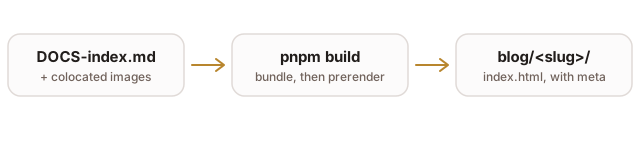
Vite rewrites that path to a content-hashed URL. A path that does not resolve
fails pnpm test immediately, so a broken image can never reach production.
One caveat worth knowing: link-preview scrapers do not render SVG. An SVG is fine inline, but a
cover:should be a PNG or a JPG.
Code
Fenced blocks are highlighted:
export function slugOf(path: string): string {
  const directory = path.slice(0, path.lastIndexOf("/"));
  return directory.slice(directory.lastIndexOf("/") + 1);
}
pnpm dev      # write, with hot reload
pnpm test     # includes the broken-image check
pnpm build    # typecheck, bundle, then prerender every route
The rest of GFM
Tables, strikethrough, task lists and autolinks all work, courtesy of
remark-gfm:
- Markdown posts with colocated images
- Real URLs, prerendered for link previews
- Something worth reading
Links go to the repo, and bare URLs like https://kuhy.duckdns.org autolink on their own.